> ## Documentation Index
> Fetch the complete documentation index at: https://wisty.ai/docs/llms.txt
> Use this file to discover all available pages before exploring further.
# Credits and plans
> Pay for generation and reach, never seats.
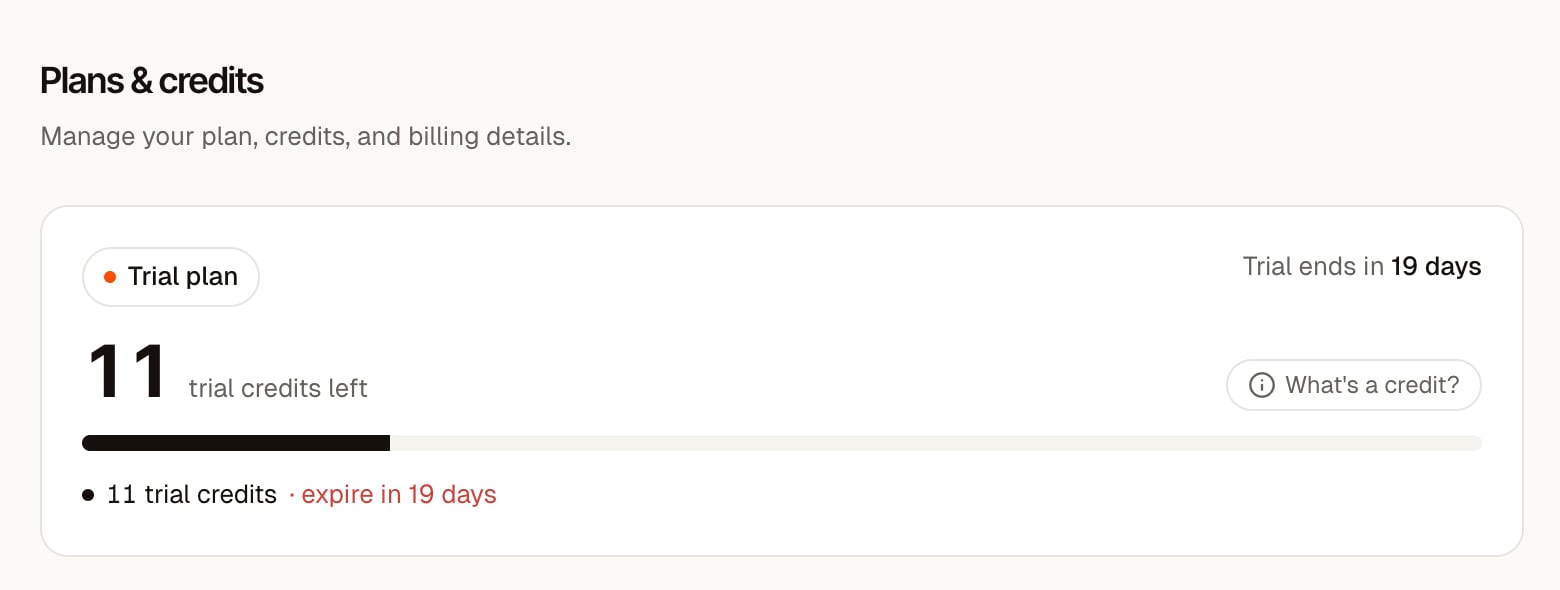
Wisty charges for generation and reach, never seats. To see your plan and balance, open the account menu at the bottom of the sidebar and click **Plans & Credits**.
That page is available to workspace admins, and the [workspace owner](/docs/billing/manage-subscription#who-manages-billing) makes the changes on it. All builders in the workspace share one credit balance.
 ## What uses credits
Credits pay for the model work done during a generation. The cost depends on the work required, including the model you use; it isn't a fixed price per prompt.
| Activity | Credit use |
| -------------------------------------- | ----------------------------------------- |
| Creating or changing a project with AI | Charged for the generation work |
| Asking the AI a question | Can use credits even when no files change |
| A failed generation | No charge for that failed run |
| A generation you stop | Charged for work already done |
| Viewing or using a published app | No credits |
| Manual code or visual edits | No credits |
The generation cost appears in chat. You can also check your balance in the account menu and review usage on **Plans & Credits**.
## Start with the free trial
Connecting your first eligible Salesforce org starts a 30-day trial with 50 credits. No card is required.
The trial includes 1 builder, publishing to 1 production Salesforce org, and an allowance of 25 monthly active viewers. You can publish and share during the trial, including inside Salesforce and through web links.
Trial credits expire when the 30 days end. At that point building is paused and published apps become unavailable to viewers until you choose a paid plan. Inside Salesforce, Wisty shows that the workspace is paused. On the web you can still open your projects, and **Plans & Credits** shows the date. Running out of trial credits earlier doesn't affect viewers.
Disconnecting and reconnecting an org doesn't start another trial. Follow [Connect Salesforce](/docs/getting-started/connect-salesforce) to get started.
## Choose a plan and monthly volume
| Plan | Builders | Monthly active viewers | Production orgs you can publish into |
| ---------- | --------- | ----------------------- | ------------------------------------ |
| Starter | Unlimited | 50 | 1 |
| Team | Unlimited | 500 | Up to 5 |
| Enterprise | Unlimited | Agreed in your contract | Agreed in your contract |
Only production orgs count toward the org limit. Sandboxes, scratch orgs, and Developer Edition orgs don't. Adding a production org beyond the limit is refused until you upgrade; orgs you already added keep working after a downgrade.
Starter and Team each offer 100, 200, or 400 monthly credits. You can increase your credit volume without switching plans. Team also includes priority support; Enterprise includes dedicated support and onboarding.
All plans support the same [places to share and open apps](/docs/publishing/share-apps). Connected orgs and host orgs serve different purposes; the same Salesforce org can be both. See [Connect a host org](/docs/salesforce-setup/connect-host-org).
Current prices appear on **Plans & Credits** and the [pricing page](https://wisty.ai/pricing).
## How viewers are counted
A monthly active viewer is a distinct Salesforce user who opens a published app during the month. The same user counts once across apps and viewing locations. Builders also count when they open a published app.
The viewer allowance is monitored. Going over it doesn't interrupt an app or spend credits. If your audience regularly exceeds the allowance, Wisty will discuss a suitable plan with you.
## Monthly credits and top-ups
Monthly credits renew each billing cycle and don't roll over. On-demand packs add credits to the shared balance and are used after your monthly allowance.
Pack credits don't expire while your paid plan is active. If your team builds regularly, increasing monthly credit volume costs less per additional credit than buying packs.
Follow [Manage your subscription](/docs/billing/manage-subscription) to change your monthly volume or buy a pack.
## When credits run out
New generations pause across the workspace until credits renew or the workspace owner buys a pack or increases monthly volume. A trial workspace must choose a paid plan to buy more credits.
Published apps keep running when the generation balance is empty. An ended trial or subscription is different: new generations are paused and published apps are unavailable to viewers. See [Cancel your subscription](/docs/billing/manage-subscription#cancel-your-subscription).
## What uses credits
Credits pay for the model work done during a generation. The cost depends on the work required, including the model you use; it isn't a fixed price per prompt.
| Activity | Credit use |
| -------------------------------------- | ----------------------------------------- |
| Creating or changing a project with AI | Charged for the generation work |
| Asking the AI a question | Can use credits even when no files change |
| A failed generation | No charge for that failed run |
| A generation you stop | Charged for work already done |
| Viewing or using a published app | No credits |
| Manual code or visual edits | No credits |
The generation cost appears in chat. You can also check your balance in the account menu and review usage on **Plans & Credits**.
## Start with the free trial
Connecting your first eligible Salesforce org starts a 30-day trial with 50 credits. No card is required.
The trial includes 1 builder, publishing to 1 production Salesforce org, and an allowance of 25 monthly active viewers. You can publish and share during the trial, including inside Salesforce and through web links.
Trial credits expire when the 30 days end. At that point building is paused and published apps become unavailable to viewers until you choose a paid plan. Inside Salesforce, Wisty shows that the workspace is paused. On the web you can still open your projects, and **Plans & Credits** shows the date. Running out of trial credits earlier doesn't affect viewers.
Disconnecting and reconnecting an org doesn't start another trial. Follow [Connect Salesforce](/docs/getting-started/connect-salesforce) to get started.
## Choose a plan and monthly volume
| Plan | Builders | Monthly active viewers | Production orgs you can publish into |
| ---------- | --------- | ----------------------- | ------------------------------------ |
| Starter | Unlimited | 50 | 1 |
| Team | Unlimited | 500 | Up to 5 |
| Enterprise | Unlimited | Agreed in your contract | Agreed in your contract |
Only production orgs count toward the org limit. Sandboxes, scratch orgs, and Developer Edition orgs don't. Adding a production org beyond the limit is refused until you upgrade; orgs you already added keep working after a downgrade.
Starter and Team each offer 100, 200, or 400 monthly credits. You can increase your credit volume without switching plans. Team also includes priority support; Enterprise includes dedicated support and onboarding.
All plans support the same [places to share and open apps](/docs/publishing/share-apps). Connected orgs and host orgs serve different purposes; the same Salesforce org can be both. See [Connect a host org](/docs/salesforce-setup/connect-host-org).
Current prices appear on **Plans & Credits** and the [pricing page](https://wisty.ai/pricing).
## How viewers are counted
A monthly active viewer is a distinct Salesforce user who opens a published app during the month. The same user counts once across apps and viewing locations. Builders also count when they open a published app.
The viewer allowance is monitored. Going over it doesn't interrupt an app or spend credits. If your audience regularly exceeds the allowance, Wisty will discuss a suitable plan with you.
## Monthly credits and top-ups
Monthly credits renew each billing cycle and don't roll over. On-demand packs add credits to the shared balance and are used after your monthly allowance.
Pack credits don't expire while your paid plan is active. If your team builds regularly, increasing monthly credit volume costs less per additional credit than buying packs.
Follow [Manage your subscription](/docs/billing/manage-subscription) to change your monthly volume or buy a pack.
## When credits run out
New generations pause across the workspace until credits renew or the workspace owner buys a pack or increases monthly volume. A trial workspace must choose a paid plan to buy more credits.
Published apps keep running when the generation balance is empty. An ended trial or subscription is different: new generations are paused and published apps are unavailable to viewers. See [Cancel your subscription](/docs/billing/manage-subscription#cancel-your-subscription).